
Books & Audiobooks
Staff Lists

Supernatural Suspense
Best of October 2026
Season of the Witch
Browse

Book Picks Just For You
Book Picks Just For You
Answer a few questions and we'll choose the books
New Arrivals
New Arrivals
New Arrivals: Large Print
New Arrivals: Large Print

Curbside Pickup
Curbside Pickup
Place items on hold and pick them up when you're ready
Literary Gatherings
Literary Gatherings
FAQs
-
To set up a library PIN for the online catalog, visit the link below:
https://catalog.oceancitylibrary.org/patroninfo
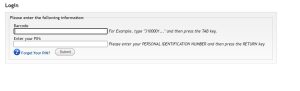
Once here, enter your library card number in the Barcode field and a 4-digit PIN of your choosing in the Enter your PIN field. Click Submit to continue.
Enter your desired PIN again in both fields shown below, then click Submit.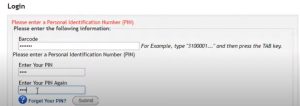
Now you can use your new PIN to access your online catalog account. Link below:
-
To manage your shelves, follow the steps in the video below.
-
To search the online catalog and place a hold on an item, visit https://oceancity.bibliocommons.com/, opens a new window and select the Log In icon in the top-right corner.
To log in, use the barcode number on the back of your library card and your PIN number. If you do not have a PIN, follow the directions listed in the "How do I set my library PIN?" question on this page.
Once logged in, you can search using the search bar or by using the Explore, New at the Library, and Browse menu drop-downs.
When you have found the desired book, click Place a Hold and confirm your pickup location. Once you've confirmed your pickup location, click Confirm Hold.
Depending on your contact information, you will receive a text, email, or phone call notifying you when the hold request is ready for pick-up.
-
To request an item for the library to purchase, visit our online catalog at https://oceancity.bibliocommons.com/, opens a new window and click Can't find an item.
In the Can't find an item menu dropdown, click Suggest a Purchase. After signing in with your barcode and PIN, click Add Suggestion on the right side of the page.
Submit your suggestion by entering information related to the desired item. Begin by entering the item's Title, Author, Performer, or Director, and by selecting Next.
Complete the suggestion by providing information in the required fields (Format, Audience) and clicking Submit.